
Manage Your Pockets
Find any Pocket in a second, tidy up the ones you're done with, and see every dollar that moved.
Search, filter, group and sort
The tools sit above your list on the Pockets screen.
- Search matches a Pocket's name, its category, or the text of any transaction in it. Typing "costco" finds your Costco Membership Pocket first, then the Groceries Pocket holding your Costco runs.
- Filter (the funnel) narrows the list by Pocket type, Status (Active, Paused or Archived), Category, Frequency, and a range for the Need, the Pocketed amount or the due date. The funnel turns purple while a filter is on, and the ✕ beside it clears everything.
- Group by puts your Pockets under headers by Category, Frequency or Pocket Type. Each header shows what the group averages per paycheck. The button next to it collapses or expands every group.
- Sort by orders them by Due Date, Title, Pocketed, Need or Per Paycheck. The button beside it flips the direction.
Pause, archive or delete
Tap ⋮ on a Pocket's card for these. They do very different things with the money.
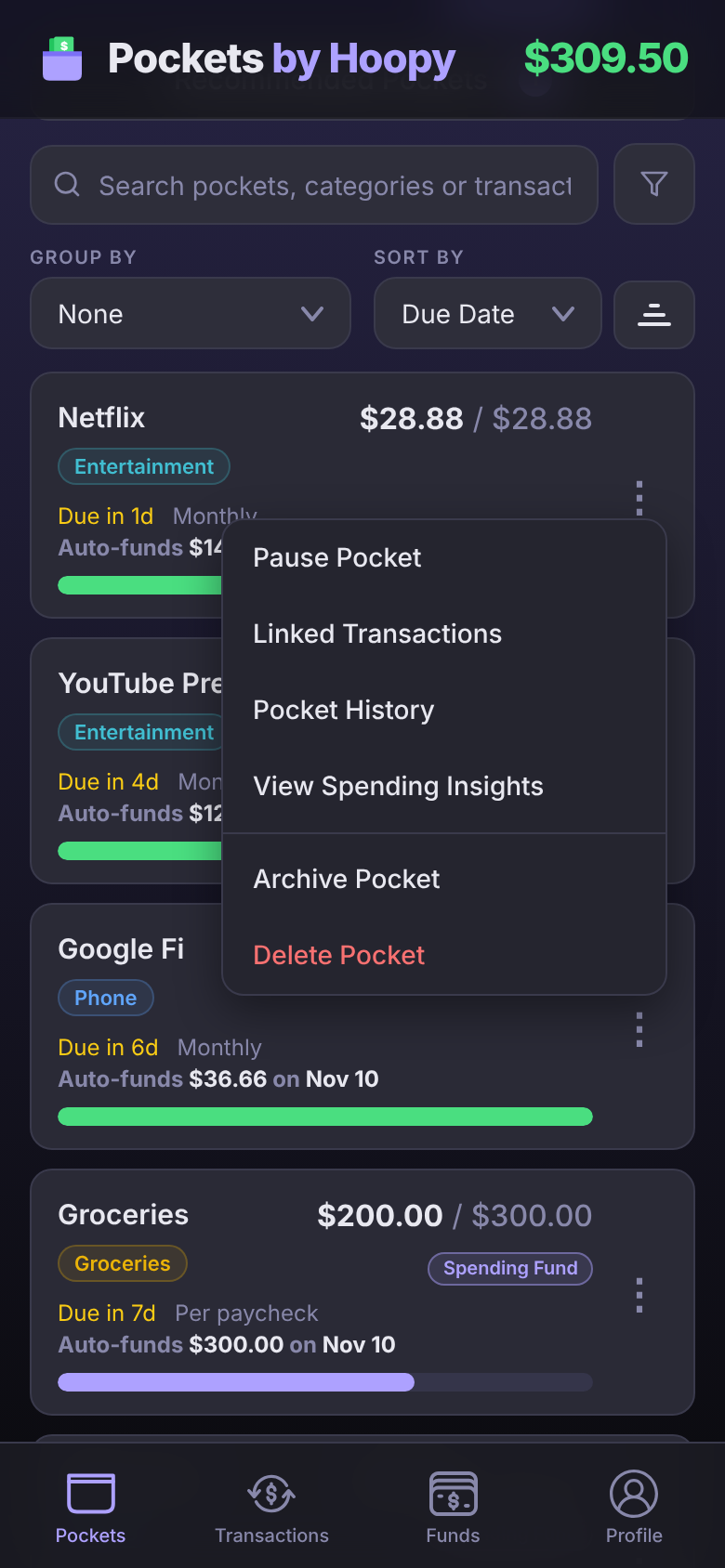
Pause Pocket
Stops payday funding and nothing else. The Pocket keeps its money, still counts against Good to Go, and you can still put transactions in it. Use it for a gym membership you've put on hold: the $40.00 already Pocketed stays there for when you go back. Tap Resume Pocket to start funding again.
Archive Pocket
Retires the Pocket. Its money goes back to Good to Go, and the app tells you how much ("$68.86 released to Good to Go"). It moves to an Archived section at the bottom of your list and keeps its transactions and history, but it isn't funded and holds no money. Use it for a bill you've paid off or a subscription you cancelled.
Changed your mind? Tap Unarchive Pocket. The money doesn't come back on its own; fund the Pocket again if you want it there.
Delete Pocket
Removes the Pocket for good. Whatever it held goes back to Good to Go. If transactions are in it, you choose what happens to them:
- Link Transactions to Another Pocket moves them to a Pocket you pick, then deletes this one.
- Archive Instead keeps everything. This is the recommended choice.
- Delete Pocket takes the transactions out of the Pocket, so they count against Good to Go, and deletes it. This can't be undone.
Not sure? Archive. It gives the money back just like deleting, and you keep the record of what the Pocket paid for.
Change several at once
- Press and hold a Pocket, or tap ⋮ next to + Pocket and choose Select Pockets. On a computer you can also right-click a Pocket.
- Tap the other Pockets you want. A bar at the bottom counts them.
- Tap Actions and choose Assign Category, Pause, Resume, Archive or Delete.
Pick Netflix, YouTube Premium and Google Fi, tap Archive, and the app tells you how much goes back to Good to Go before it does anything. Cancel leaves select mode.
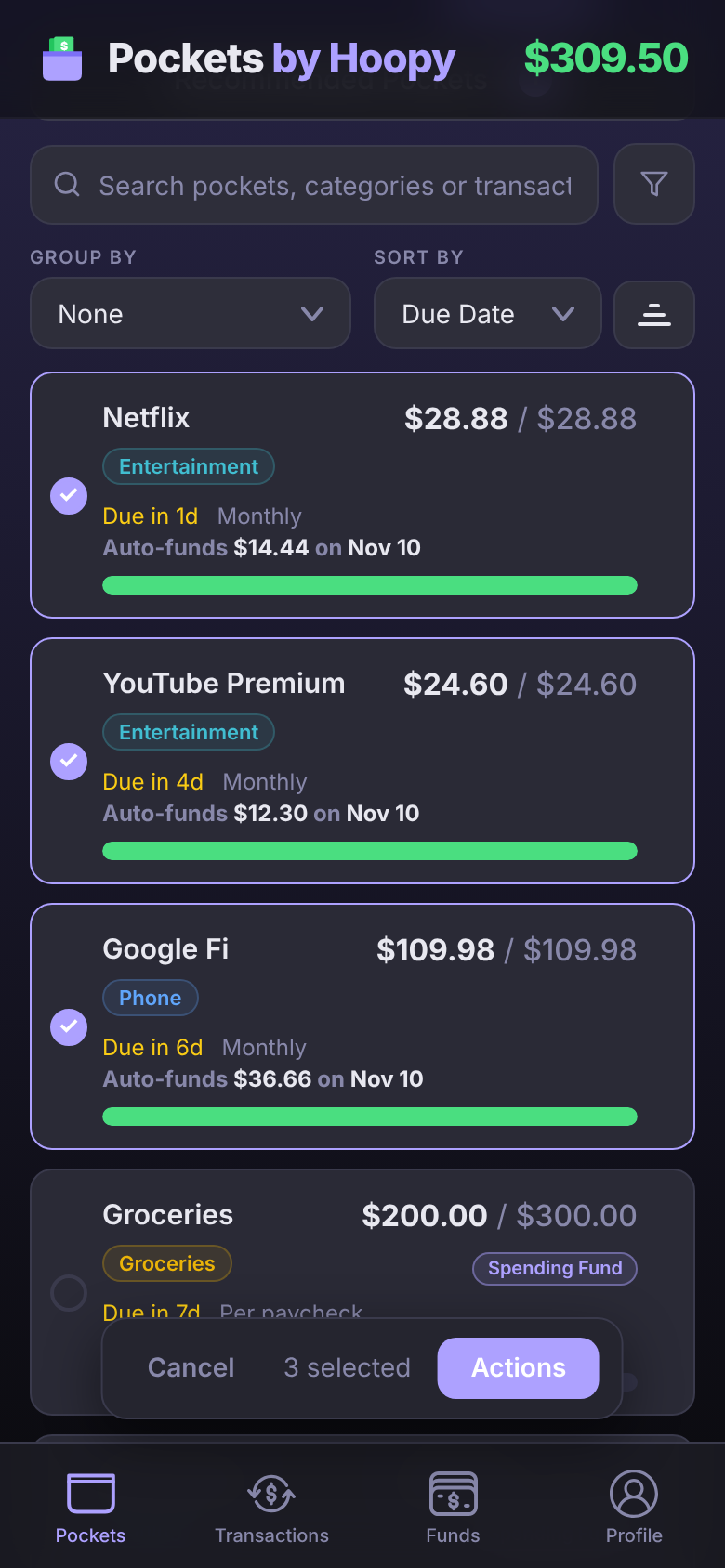
Deleting several at once only deletes Pockets with no transactions in them. Delete the others one at a time, so you can choose where their transactions go.
Pocket History
Every change to a Pocket is written down: money funded on payday, money you added or removed and where it went, transactions linked or unlinked, a new Amount Due or due date, and a rename. Tap ⋮ on the Pocket and choose Pocket History.
Each row says what happened, when, what was on the other end (a paycheck, a merchant, Good to Go or another Pocket) and what the Pocket held afterward. If you connected Claude or ChatGPT and it made the change, the row ends "via Claude" or "via ChatGPT".

Deleting a Pocket keeps its history, with a final row saying it was deleted.
Recommended Pockets
The app watches for charges that repeat, like a $13.90 Spotify charge on the 2nd of every month, and suggests a Pocket for any that doesn't have one. When it finds some, Recommended Pockets appears on the Pockets screen with a count.
- Accept creates the Pocket with the amount and due date it found.
- ⋮ on a suggestion has Edit, to open it in the Pocket editor first, and Dismiss. Link to existing moves its charges into a Pocket you already have.
- Accept All and Dismiss All handle the whole list. Dismissed ones come back under ⋮ → Show dismissed.
Questions
Where did my archived Pocket go?
To the Archived section at the bottom of the Pockets list. Tap it to open the section. Search and filters cover archived Pockets too.
Does pausing a Pocket stop the bill?
No. The app doesn't pay bills; pausing only stops it funding the Pocket on payday. Cancel the bill with whoever sends it.
Can I see a deleted Pocket's history?
Not yet. The history is kept, but there's no screen for a deleted Pocket. If you might want it later, archive the Pocket instead.