
Good to Go, Explained
One number that tells you what you can spend right now without shorting a bill.
How it's worked out
Good to Go is your bank balance minus everything you've set aside in your Pockets:
Good to Go = balance of the accounts you count − everything Pocketed
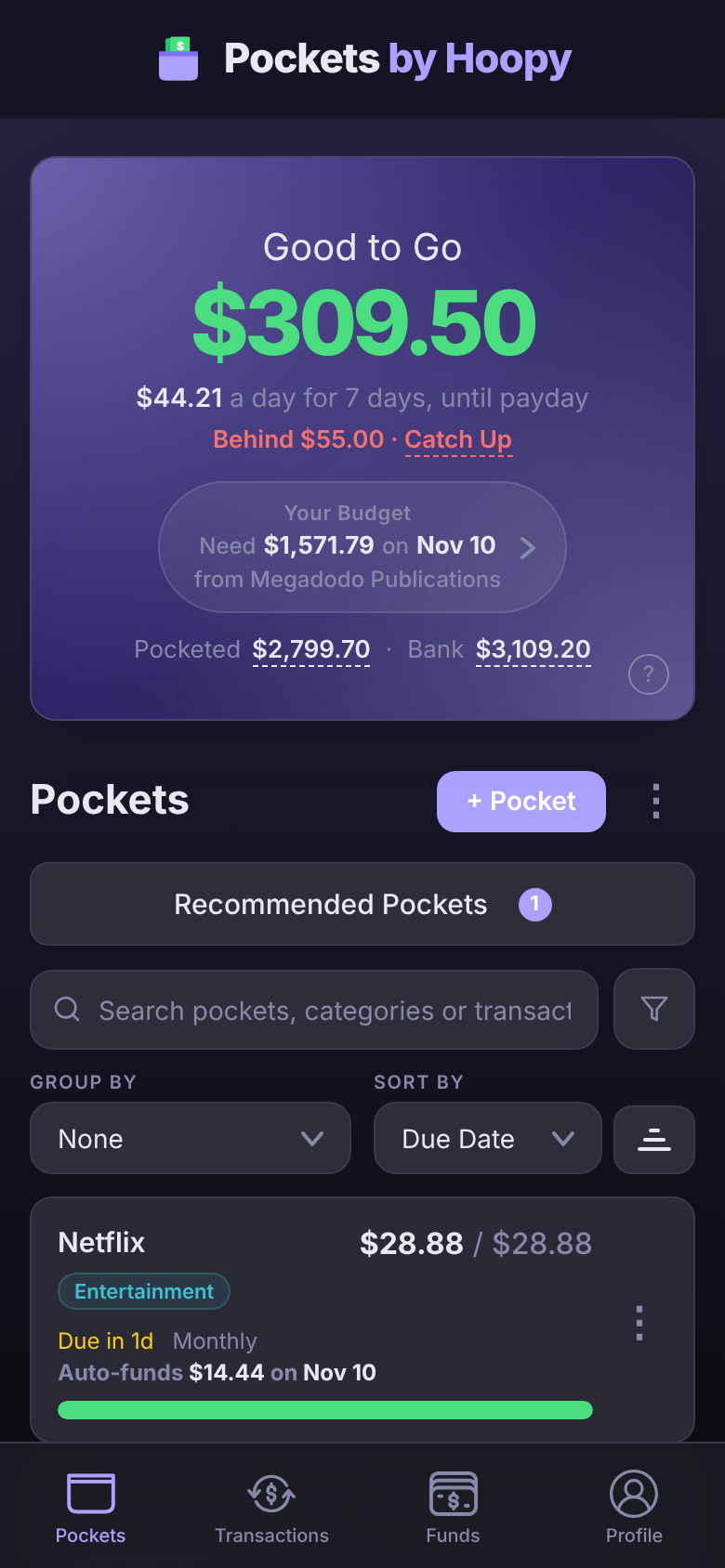
Say your checking account has $3,109.20 and your Pockets hold $2,799.70 between them, for rent, the car payment, groceries and the rest. Your Good to Go is $309.50. That's the money no bill is waiting on.
Both figures are in the Good to Go box, under Your Budget: Pocketed $2,799.70 · Bank $3,109.20. Tap either amount to see what makes it up: Bank lists the accounts you count, by type, and Pocketed lists every Pocket holding money. The same Good to Go shows in the header on the other tabs, and the ? beside it explains it in the app.
Under the amount, $44.21 a day for 7 days, until payday spreads your Good to Go over the days to your next payday. When a bill can't be fully funded in time, Behind $55.00 · Catch Up shows too; tap Catch Up to fix it (see Behind, Catch Up and Top Up).
A Pocket isn't a separate bank account. The money stays where it is; a Pocket just marks part of it as spoken for.
Which accounts count
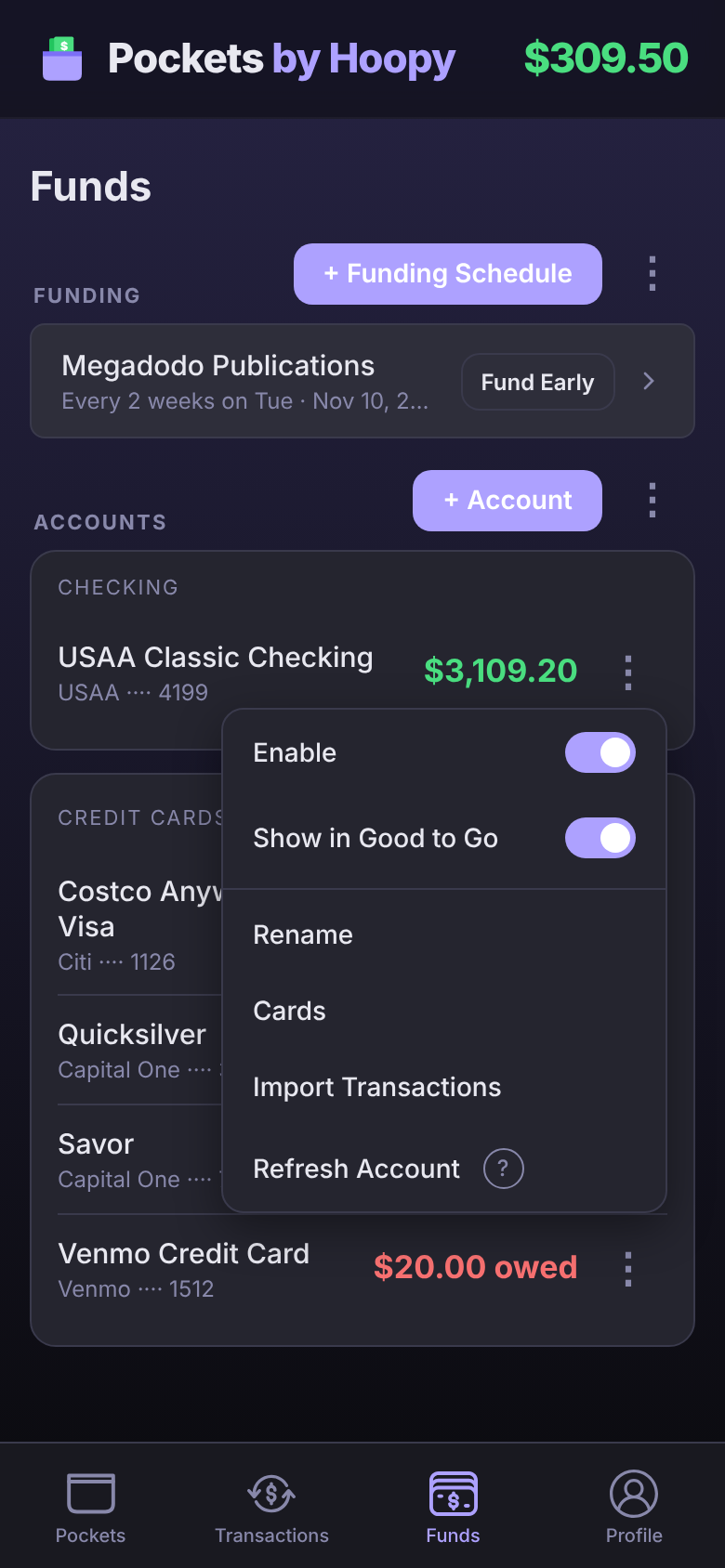
Your checking account counts by default. To include or leave out an account:
- Tap Funds at the bottom of the screen.
- Tap ⋮ next to the account.
- Turn Show in Good to Go on or off.
Leave out an account you don't spend from day to day, like a savings account you never touch, so its balance doesn't make Good to Go look bigger than it is.
- Loans and investments never count. What you owe or have invested isn't money to spend, so they don't have the switch.
- Credit cards don't have the switch either. With Credit Card Integration (Premium) turned on in the card's ⋮ menu, each card purchase is set aside in the card's payment Pocket, so it comes out of Good to Go when you spend rather than when the bill arrives.
Why it changed
Good to Go moves whenever your balance or your Pockets do. The usual reasons:
- Payday funded your Pockets. Your paycheck raises your balance, and funding moves each Pocket's share out of Good to Go. A $1,940.00 paycheck that funds $1,571.78 into Pockets adds $368.22 to Good to Go. Funding runs on its own on payday, at midnight your time, as long as Good to Go can cover it; the day after payday it funds no matter what. Fund Early does it early.
- You spent money. A purchase that isn't in a Pocket comes straight out of Good to Go.
- A transaction was assigned to a Pocket. Then it spends from that Pocket instead. Spend $100.00 at the grocery store and Good to Go drops by $100.00; put it in your Groceries Pocket and Groceries drops by $100.00 while Good to Go goes back up by $100.00. If the Pocket held less than the purchase, the rest still comes out of Good to Go.
- You moved money yourself. Adding funds to a Pocket, Catch Up and Fund Early lower Good to Go. Removing funds, archiving a Pocket or deleting one gives its money back.
- Your bank updated your balance. A deposit, a refund or a charge that hadn't synced yet.
To see exactly what moved in or out of a Pocket, open its ⋮ menu and tap Pocket History. See Pocket History.
When it's negative
A negative Good to Go, in red, means your Pockets hold more than your accounts do. If your checking has $1,200.00 and your Pockets hold $1,350.00, Good to Go is −$150.00: you've promised $150.00 you don't have yet. Nothing breaks, and on payday your Pockets still get funded.
To get back above zero:
- Put recent purchases in their Pockets. A grocery run that's still sitting in Good to Go should come out of Groceries. Open the transaction and pick the Pocket.
- Take money out of a Pocket you won't need before payday. Open the Pocket, tap ⋮ next to Pocketed, then Remove Funds. Unless you pick another Pocket to move it to, it goes back to Good to Go.
- Hold off on spending until payday. The paycheck usually closes the gap. Your Budget, under Good to Go, tells you whether it will (below).
Catch Up won't fix a negative Good to Go. It moves money from Good to Go into Pockets that are behind, so it lowers Good to Go further.
Your Budget
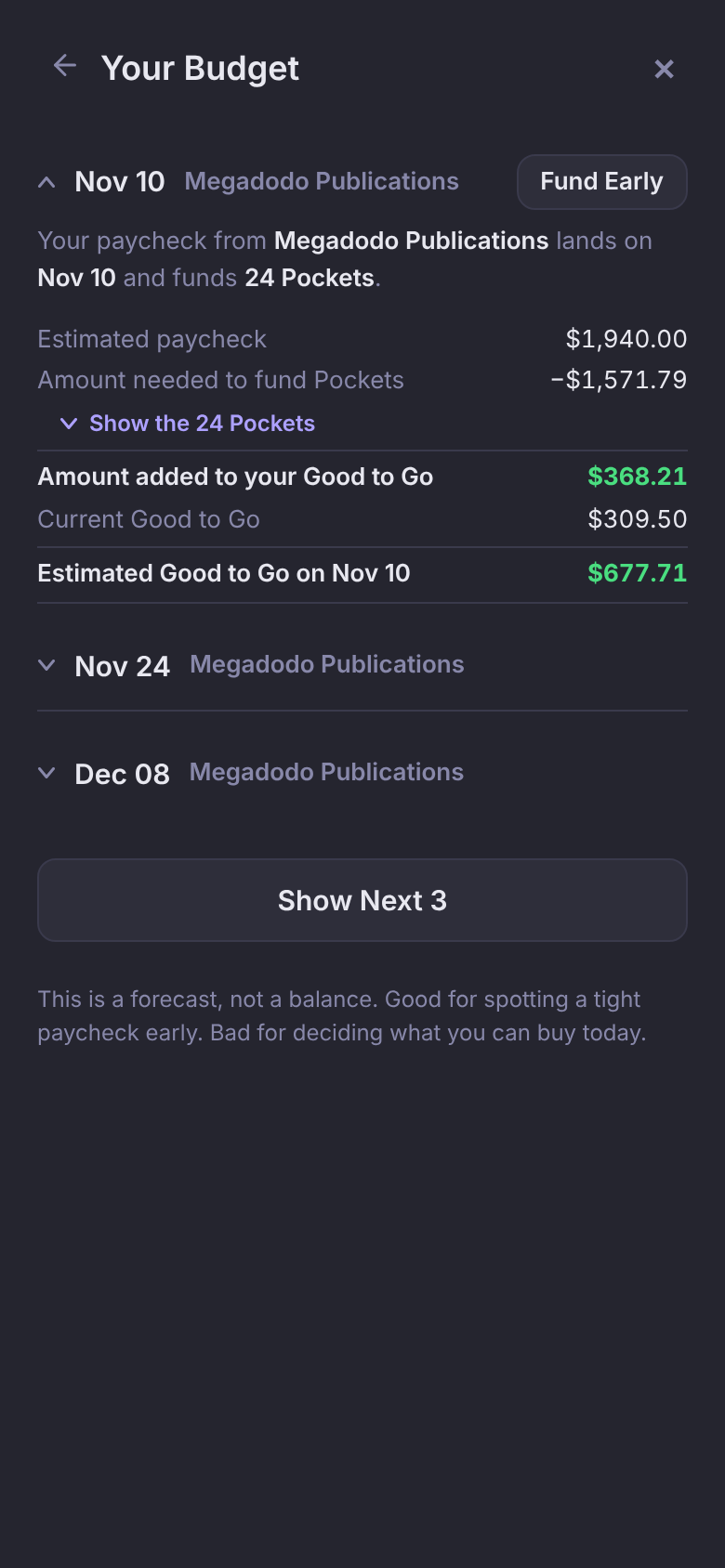
Your Budget, under Good to Go, shows your next paycheck: Need $1,571.79 on Nov 10 means that paycheck will fund $1,571.79 into your Pockets. The line under it names the paycheck: from Megadodo Publications.
- Short $N, in red, means that paycheck plus your current Good to Go won't cover what your Pockets need.
- Over budget $N means your Pockets ask for more than the paycheck you entered. That's about how the budget is built, so it's the one to fix by lowering a Pocket or raising your Estimated Amount.
Tap Your Budget to open it. Each upcoming paycheck gets a row, the soonest one open, working down a column:
- Estimated paycheck, then Amount needed to fund Pockets. Tap Show the 24 Pockets to see what each one gets.
- Amount added to your Good to Go: what's left of the paycheck.
- Current Good to Go, and at the bottom Estimated Good to Go on Nov 10, or Short in red if it won't add up.
Tap another date to open it, or Show Next 3 to look further ahead. Fund Early beside your next paycheck funds its Pockets now (see Fund Early). It's a forecast, so spending between now and payday will change it.
Seeing Set up funding schedule → instead of Your Budget? Add your paycheck first. See Add your paycheck. Without an Estimated Amount, Your Budget can't tell you whether your Pockets fit.
Questions
Why doesn't Good to Go match my bank balance?
Because it isn't your balance. It's your balance minus what your Pockets hold. Your bank shows $3,109.20; Good to Go shows $309.50, because $2,799.70 of that is already set aside for bills.
Do paused Pockets count?
Yes. A paused Pocket keeps its money, so that money still comes out of Good to Go. Archiving a Pocket is what gives its money back.
Good to Go dropped on payday. Is that right?
If the paycheck hasn't landed yet, yes. Funding moves money into your Pockets, and a paycheck that's still on its way hasn't raised your balance. Once it arrives, Good to Go goes up by the paycheck.